
Commercial
What Is AIA Billing? G702 and G703 Forms Explained
AIA billing invoices commercial progress payments using the G702 cover sheet and G703 schedule of values. What each form does, and why invoices stall.
9
min read
•
July 26, 2025

By: Amanda Georgescu, Founder & CEO of Glazier Software
AIA billing refers to a standardized set of forms from the American Institute of Architects used to invoice for work completed on a project over time. They’re most common on commercial projects and are typically submitted monthly.
The two core forms are:
| Form | Purpose |
|---|---|
| G702 – Application and Certificate for Payment | Summarizes your current billing request. |
| G703 – Continuation Sheet | Breaks down the job into line items and tracks how much of each has been completed to date. |
Together, they:
- Provide a consistent format for billing
- Help general contractors review and aggregate subcontractor invoices
- Track retainage, stored materials, and percent complete
AIA Billing Meaning: The Short Definition
AIA billing means invoicing a construction project using the standardized payment application forms published by the American Institute of Architects, most commonly the G702 application and certificate for payment and the G703 continuation sheet. Rather than sending a single invoice for work completed, a contractor submits a monthly application showing the original contract value, the approved change orders, the work completed in this period, the materials stored on site, the retainage held back and the balance still to finish.
The forms exist so that three parties can read the same document and agree on it: the contractor claiming payment, the architect certifying that the work was done, and the owner releasing funds. That is why the format persists even where it is not contractually required. It is the shared language of commercial construction payment.
For a glazing contractor the practical meaning is narrower. If a general contractor asks for AIA billing, they are asking for a monthly payment application, broken down against an agreed schedule of values, with retainage tracked and change orders shown separately from the base contract. Sending a standard invoice against that request usually delays payment by a cycle, because the invoice cannot be certified in the form the architect and owner are expecting.
Step-by-Step: How to Set Up AIA Billing
1. Schedule of Values Comes from the GC
The Schedule of Values (SOV) is a breakdown of your contract amount by line item (e.g., Storefront Glazing, Doors & Hardware, Interior Glass, etc.).
Importantly, on AIA jobs, you don’t create the SOV—the general contractor provides it. You’ll receive this at project kickoff or contract signing.
Your job: bill against this schedule each month by entering your percent complete per line item.
2. Track Progress and Supporting Details
Since AIA billing is based on progress, it's critical to have accurate documentation to back up what you're billing.
Glazier helps you gather the right context during the billing period by:
- Pulling in received Purchase Orders tied to the job
- Surfacing labor hours tracked during the billing period
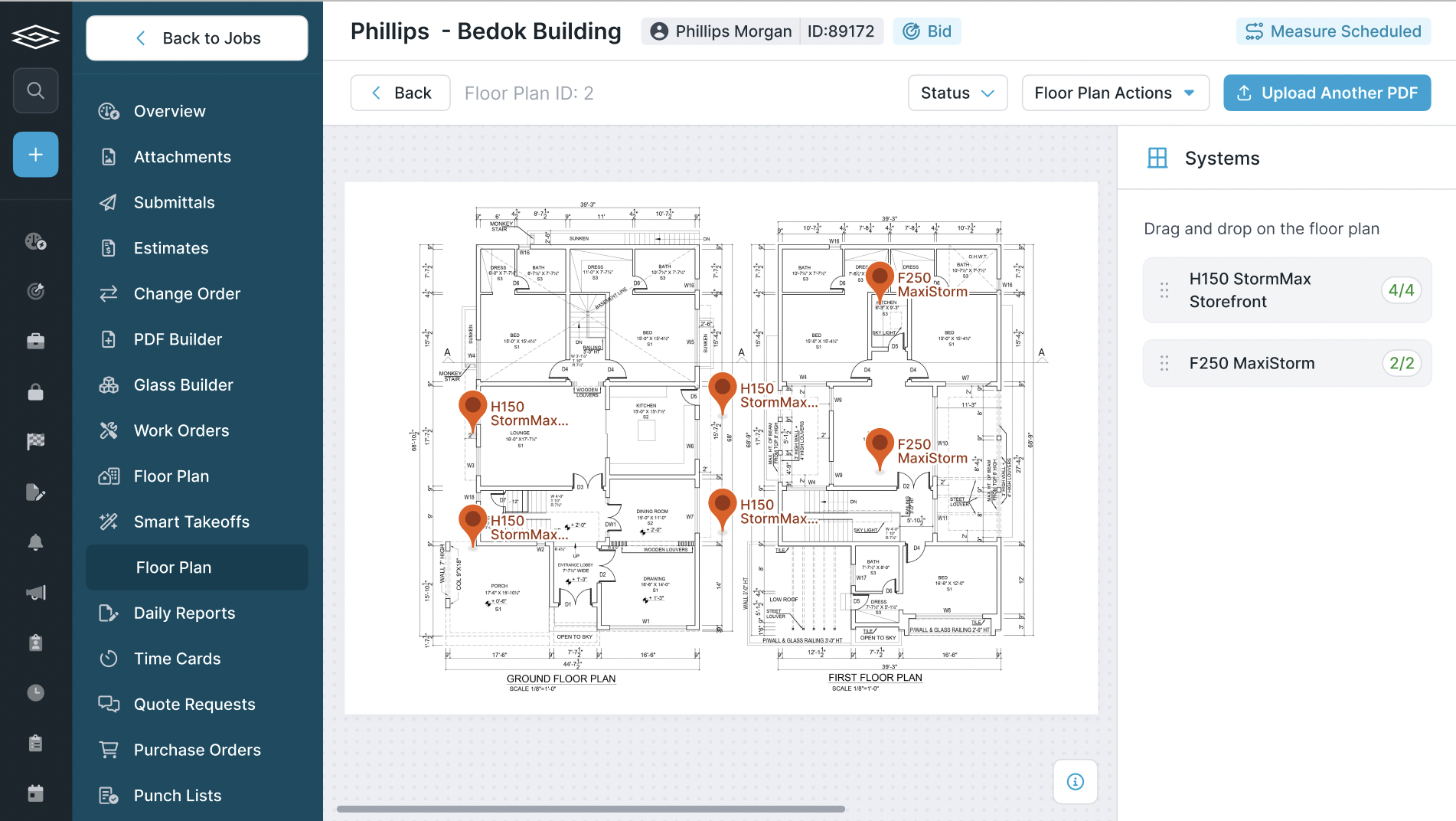
- Showing completion status by opening, using pin statuses and job data from the field
This makes it easier to justify your % complete claims and avoid pushback from the GC.
🧠 Instead of guessing at how much is done, Glazier gives you a clear picture based on real field data and procurement status.


3. Fill Out the G702 and G703 Forms
Using your progress data and the provided SOV:
- Enter percent complete for each line item (G703)
- Indicate any stored materials on site
- Apply retainage (typically 5–10%)
- Use G702 to summarize billing to date, amount due, and previous payments
Glazier customers can generate AIA-style billing outputs directly from tracked job data—eliminating manual spreadsheets or guesswork.
.avif)
4. Submit Monthly for Approval
AIA billing is submitted monthly—usually around the 25th to align with monthly draw schedules. Once submitted, the GC will review your progress claims, approve (or adjust), and pass it up the chain for payment.
Payments typically follow Net 30 or Net 45 terms after approval.
Common Mistakes to Avoid
- Billing without field or PO backup
- Misaligning your line items with the GC’s schedule of values
- Overstating % complete without documentation
- Forgetting to include stored materials
- Misapplying or ignoring retainage
How Glazier Helps
Glazier is built to support subcontractors doing complex commercial work—including AIA billing. Here’s how we cut the steps:
- Automatically pulls labor hours and PO delivery status for the billing period
- Shows progress by opening so you can confidently enter % complete
- Keeps job financials and field status in one place, so your office team doesn’t have to chase down updates
- Exports clean billing summaries to match your GC’s expectations
Real-World Impact: What Glass Companies Are Saying
Glass contractors using Glazier's AIA billing consistently report significant improvements in their commercial operations:
John Thompson, General Manager at Lee Glass and Window, found that Glazier's automated form generation eliminates the fragmented workflow his team previously faced. Instead of manually creating schedules of values, pay applications, and invoices across multiple systems, everything is generated automatically from the job data. Thompson estimates this saves his team 10-15 minutes per project on AIA billing, and when managing multiple commercial jobs simultaneously, these time savings compound.
Andrea Elliott, Owner of Elliott Glass, credits Glazier's AIA billing capabilities as essential for growing their commercial portfolio. The streamlined process has allowed Elliott Glass to take on more commercial projects without adding administrative overhead, making it much easier to handle the complex billing requirements these jobs demand.
Dallas Miller from Lore L Ltd appreciates how change orders integrate with AIA billing in Glazier. The simplified setup process allows his team to focus on project execution rather than paperwork management, with settings like retainage and billing dates configured with just a few clicks.
The Bottom Line: Glass contractors using Glazier's AIA billing consistently report the same benefits: significant time savings, reduced errors, and the confidence to pursue more commercial work. Instead of spending hours manually creating forms and chasing down project data, they're getting paid faster and growing their commercial portfolios.
What to Look for in AIA Billing Software
If you are comparing AIA billing software, the question is not whether it prints a G702. It is whether the pay application survives the review it is about to get. For glazing contractors specifically, AIA billing software should carry the schedule of values from the original bid through every progress payment without re-keying, because the line items on a glass package rarely match the owner's format.
- Builds the G702 cover and the G703 continuation sheet from one Schedule of Values, so the two cannot disagree
- Tracks retainage per line item and carries it forward between pay applications instead of recalculating it by hand
- Keeps the previous application values, so each period bills the difference rather than being retyped
- Locks line items to the schedule of values issued by the GC, because a renumbered line is the quickest way to have a pay app returned
- Exports a PDF the GC will accept, with continuation sheet totals that reconcile to the cover
Can you do AIA billing in QuickBooks?
Partly, and the gap is worth knowing before you commit to a workflow. QuickBooks handles the accounting side well: the invoice, the receivable, the job cost. What it does not produce natively is a compliant G702 cover with a G703 continuation sheet that reconciles to it, tracks percentage complete per line, and carries retainage the way a GC expects to receive it.
Most glazing contractors bridge that gap one of three ways. They rebuild the pay app in a spreadsheet each month and re-key the totals, which works and is where most billing errors come from. They buy a add-on that generates the forms. Or they run a system that produces the pay app directly from the schedule of values and syncs the resulting invoice into QuickBooks, so the accounting stays where the bookkeeper expects it and the forms come out compliant.
If QuickBooks is already your ledger and you do not intend to move it, that last shape is usually the one to look for. We cover how that sync works in more detail in QuickBooks integration for glass companies.
Want help setting up AIA billing in Glazier? Book a free demo today with a product expert today.
Frequently Asked Questions (FAQ)
What is AIA billing and when is it used?
AIA billing refers to a standardized set of forms from the American Institute of Architects used to invoice for work completed on a project over time. It's most common on commercial projects and is typically submitted monthly. The two core forms are G702 (Application and Certificate for Payment) and G703 (Continuation Sheet).
Do I create the Schedule of Values for AIA jobs?
No, you don't create the Schedule of Values (SOV) on AIA jobs. The general contractor provides it to you at project kickoff or contract signing. Your job is to bill against this schedule each month by entering your percent complete per line item.
How often should I submit AIA billing?
AIA billing is submitted monthly, usually around the 25th to align with monthly draw schedules. Once submitted, the GC will review your progress claims, approve (or adjust), and pass it up the chain for payment.
What payment terms can I expect with AIA billing?
Payments typically follow Net 30 or Net 45 terms after approval by the general contractor.
What's the typical retainage percentage on AIA jobs?
Retainage is typically 5-10% of the billed amount. It is held until the project is finished, so the work has to meet the contract terms before you see it.
What documentation do I need to support my AIA billing?
Since AIA billing is based on progress, you need accurate documentation including received Purchase Orders tied to the job, labor hours tracked during the billing period, and completion status by opening using field data. This helps justify your percent complete claims and avoid pushback from the GC.
What are the most common mistakes contractors make with AIA billing?
The most common mistakes include:
- Billing without field or PO backup
- Misaligning line items with the GC's schedule of values
- Overstating percent complete without documentation
- Forgetting to include stored materials
- Misapplying or ignoring retainage
Can software help automate AIA billing?
Yes, glass management software like Glazier can automatically pull labor hours and PO delivery status for the billing period, show progress by opening so you can confidently enter percent complete, keep job financials and field status in one place, and export clean billing summaries to match your GC's expectations.
How much time can I save with automated AIA billing?
According to glass contractors using Glazier, automated AIA billing can save 10-15 minutes per billing per project. When managing multiple commercial jobs simultaneously, these time savings compound significantly and allow teams to focus on project execution rather than paperwork management.
Why is mastering AIA billing important for my business?
Mastering AIA billing is essential if you want to be paid in a timely manner.
What is AIA billing in construction?
In construction, AIA billing is how a subcontractor claims payment for work completed to date. Each period you update the schedule of values with the percentage complete per line item, carry the total to the G702, and submit it for the architect's certification before the owner releases funds.
What is an AIA invoice?
An AIA invoice is the G702 application and certificate for payment, submitted with its G703 continuation sheet. Unlike an ordinary invoice it shows the contract sum, the work completed to date, materials stored, retainage held, and the net amount now due.
What is AIA style billing?
AIA style billing is the same document set used without a formal AIA contract in place. Owners often ask for AIA style invoices because the format is familiar to lenders and architects, even on projects where the contract itself is a custom agreement.
Final Thoughts
Mastering AIA billing is a must if you want to be paid in a timely manner. The process might seem tedious at first, but with the right systems in place, it becomes a predictable routine and a faster path to getting paid.
Explore Our Success Stories

Streamline your glazing operations.
Book a demo today and find out how Glazier can transform your glass business.
The all-in-one platform built for glass & glazing — quoting to cash, powered by AI.